












Vehicle Camera System for Fleet Control
Camera System for Fleet Control
Installing the YUWEI Fleet Camera System can improve driving safety, clarify driver responsibilities and optimize fleet monitoring. Proper installation is the key to realizing the investment value. This document features the YUWEI V5C Dual-Camera AI Dash Cam, and also introduces the skills of system installation, equipment selection and performance guarantee, providing a cost-effective solution for fleet monitoring.

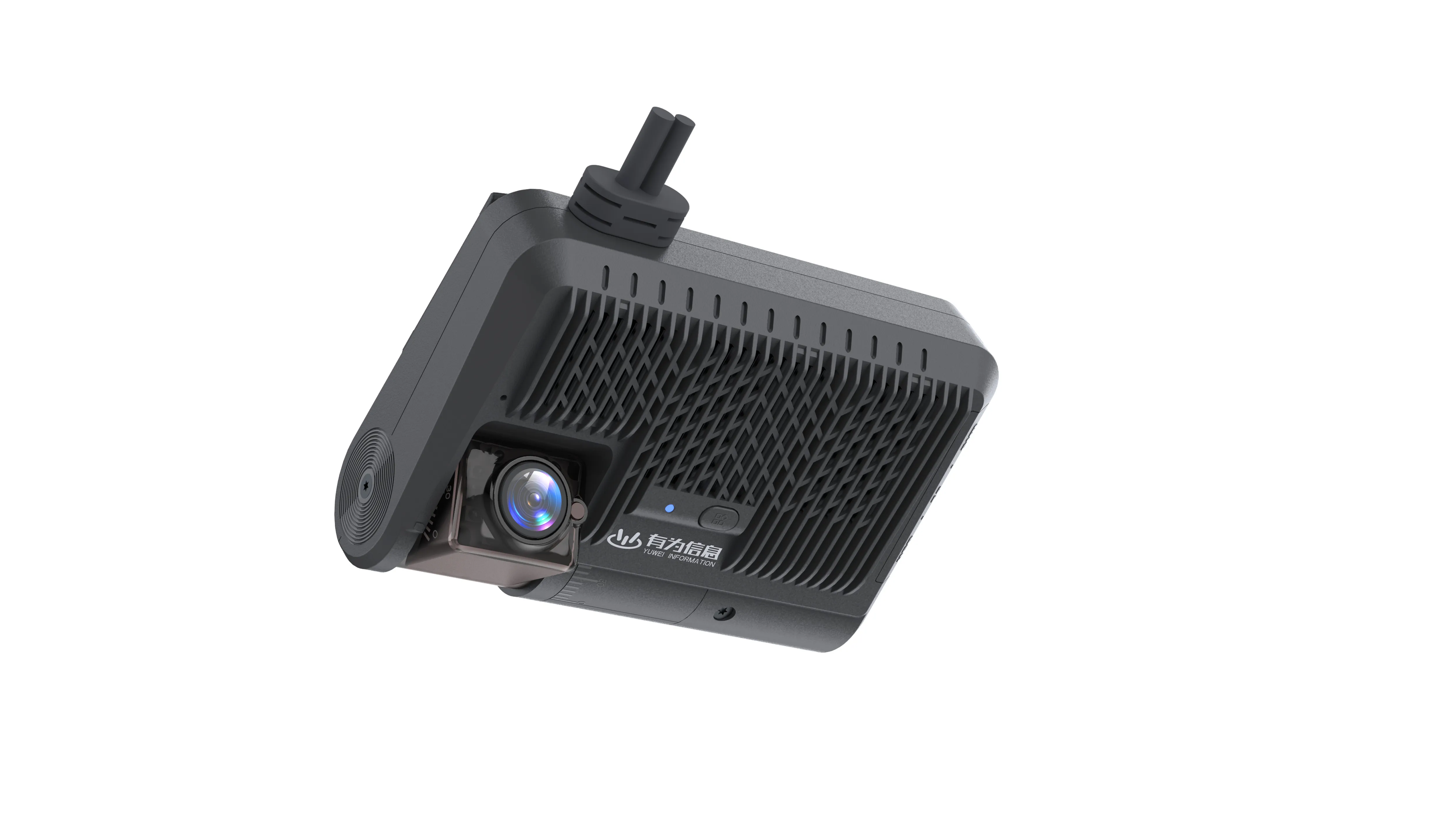
YUWEI V5C Dual-Camera AI Dash Cam
A cost-effective all-in-one AI dash cam with a compact body, supporting real-time video transmission and precise positioning. It has a built-in face recognition algorithm, suitable for safety monitoring scenarios such as commercial fleets and logistics vehicles, and is the first choice for front and rear dual-camera monitoring of fleets.
Core Functions
1. Dual-Camera HD Recording: 1080P/140° wide-angle front camera and 720P/150° wide-angle internal camera, capturing road conditions and driving behaviors synchronously.
2. Dual-Mode Positioning + Full Netcom: Beidou + GPS dual-mode positioning, with a built-in 4G LTE full-network module for cross-regional precise positioning and real-time position transmission.
3. Intelligent AI Functions: Integrated with ADAS driving assistance, DSM driver monitoring and face recognition, providing real-time early warning for driving violations.
4. Multi-Scenario Adaptation: G-sensor collision detection, two-way voice intercom, maximum 1TB single TF card support, and efficient H.264/265 compression.
5. Tamper-Proof & High Durability: Built-in anti-tamper sensor that triggers instant background alarms for lens obstruction or device disassembly; operating temperature range of -20℃~+70℃, compatible with 12V/24V vehicles, suitable for complex road conditions.
Core Advantages
High cost performance, easy installation (completed in 20 minutes), supporting unified background management of multiple vehicles and automatic generation of operation reports; AES-256 data encryption with dual protection of local and cloud storage; open API interface for docking with existing fleet management systems.
Core Value of the System
Grasp the real-time operation status of vehicles, help monitor driving behaviors, reduce accidents and prevent false claims; promote safe driving, optimize management decisions and lower fleet operation costs.
Essential Installation Equipment
1. Dash Cam: YUWEI V5C dual-camera model is recommended first, and front-view or multi-camera configurations can be selected as needed.
2. Wiring Harness: Precisely matched with camera and vehicle models.
3. Mounting Bracket: Adjustable type is recommended to improve installation flexibility.
4. Power Connector: Supporting hard-wire connection or cigarette lighter power supply.
5. Data Storage: SD card local storage or cloud storage can be selected as needed, adapting to the V5C's maximum 1TB TF card expansion requirement.
Step-by-Step Installation Guide
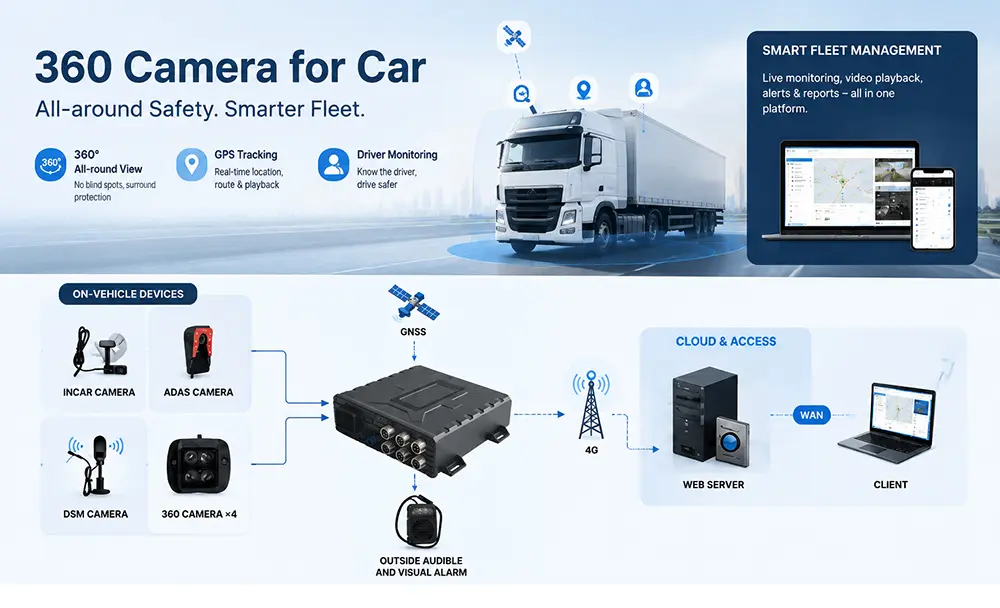
1. Installation Planning: Install the front camera on the windshield, the internal camera for driver monitoring, and side/rear cameras to eliminate blind spots and assist in reversing; the V5C is a front + internal dual-camera model, which can achieve dual-view coverage by directly fixing it on the windshield.
2. Pre-Installation Test: Power on the camera and check whether the functions and images are normal; the V5C can be turned on directly to test dual-camera, positioning and network functions.
3. Camera Fixation: Fix with an adjustable bracket to ensure the shooting angle, avoiding view obstruction and non-compliant positions; the compact V5C body does not block the driver's view during installation.
4. Wiring Connection: Arrange the wiring harness hidden inside the vehicle, fix it with cable ties/clips to prevent suspension, and ensure a firm power connection; the V5C is compatible with 9V~36V voltage without modifying the original vehicle wiring.
5. System Configuration: Set video recording preferences and enable detection/alarm as needed to ensure sufficient storage capacity; cloud storage requires network connection verification for upload; the V5C can be directly connected to the supporting management platform for batch parameter setting.
6. Full System Test: Conduct a comprehensive test of images, storage and alarm functions and optimize in a timely manner; focus on testing the V5C's AI early warning, two-way voice and positioning transmission functions.
Solutions to Common Installation Problems
1. Power Supply Issues: Failure to start due to loose wiring or incompatible wiring harness; check the interface and use a matched wiring harness; the V5C is equipped with a special adaptive wiring harness to avoid power supply compatibility problems.
2. View Obstruction: Blind spots and image obstruction caused by improper installation; adjust the position to ensure coverage of the monitoring area; the V5C's wide-angle design can reduce blind spots with reasonable fixation.
3. Poor Image Quality: Caused by dirty lenses or improper parameters; clean the lenses regularly and debug the parameters; the V5C supports image quality adjustment to adapt to different light environments.
4. Storage Limitation: Video loss due to insufficient capacity; monitor storage regularly and prioritize cloud storage; the V5C supports 1TB large-capacity cards, and long-term storage can be achieved with cloud backup.
Daily Maintenance Tips
1. Conduct regular inspections of cameras, wiring harnesses and brackets, and handle potential problems in a timely manner; focus on checking the lens cleanliness of the V5C and the fixation of anti-tamper screws.
2. Upgrade the firmware of YUWEI cameras in a timely manner to optimize performance and unlock new functions.
3. Back up video data regularly to prevent loss; the V5C supports automatic cloud backup, and the data retention period can be set to 15-90 days.
4. Conduct driver training to explain the system value and guide fault reporting; clarify the tamper-proof function of the V5C to eliminate man-made damage.
Comparison of Installation Methods
1. Professional Installation: Operated by technical personnel with standardized wiring, optimal camera positions and reasonable configuration, avoiding problems and saving time; suitable for batch fleet installation of the V5C.
2. DIY Installation: Lower cost, suitable for small fleets with basic technical capabilities; the V5C is easy to install without professional modification, and can be operated by beginners.
Maximizing System Value
Standardized installation and daily maintenance are the prerequisites for the system to function effectively; choosing the cost-effective YUWEI V5C can reduce accidents, lower insurance premiums and improve operational efficiency with clear video recording and reliable alarms; combining functions such as real-time monitoring and cloud storage can further enhance driving safety and operational transparency.
Summary
When installing the YUWEI Fleet Camera System, the YUWEI V5C Dual-Camera AI Dash Cam is the preferred choice, which balances practicality and cost performance. Meticulous planning and careful operation are required for system installation, and following this guide can ensure standardized installation, reduce faults and give full play to the monitoring effect. Whether it is professional installation or DIY, the core is to ensure the system functions. Relying on the intelligent monitoring capability of the V5C, it can protect fleet assets and optimize overall operations.
More: in vehicle surveillance camera | best semi truck multi camera system | vehicle camera system with dvr | driver fatigue monitoring system
Email:hello@yuweitek.com